
Introduction
Technical preamble
Authentication
Format of requests
Versioning
Endpoints list
Postman collection
Return codes
API guide
Introduction
Shadline provides its customers with an Application Programming Interface (API) that enables automated file management of its dedicated Storage instance.
Shadline’s technology ensures data protection and notably reinforces compliance with the RGPD (General Data Protection Regulation) which came into force in May 2018.
Our solution is distinguished from other storage services by multiple data encryption mechanisms (« in motion » and « at rest »), coupled with file fragmentation.
Thanks to this API, Shadline allows you to quickly deploy containers, i.e. secure and watertight storage areas to guarantee the confidentiality, integrity, availability and isolation of your company’s critical data.
Technical preamble
A RESTful API
The API proposed by Shadline complies with the RESTful standard (REpresentative State Transfer).
All flows exchanged with the API are encrypted in HTTPS using the TLS protocol. Only TLS secured connections are accepted by the Shadline infrastructure.
The two formats returned by the API are binary (return when requesting a file) and JSON (JavaScript Object Notation).
Functions exposed by the API
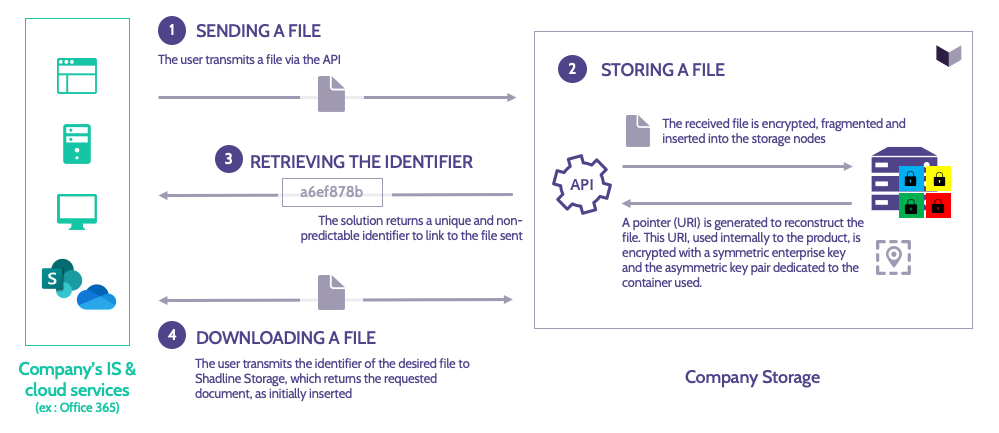
The web services exposed by Shadline allow API users to benefit from secure file storage. The major functionalities available to manage documents are:
- Storing files in Shadline (upload)
- Retrieving files stored on Shadline (download)
- Deleting files stored on Shadline (erasure)
The storage operation must be performed on a file-by-file basis. The API does not currently support batch file storage.
Functions allowing to list documents, to organise them in a tree structure (visible from the Shadline web and mobile application), to obtain metadata and statistics related to the use of the service are available. It is also possible to assign an expiry date to each file after which it will be automatically deleted.
These functionalities are detailed in the rest of this document by describing the associated requests, the necessary parameters and the possible return codes.
Limits of use
Each customer can use his company storage to upload the files of his choice. The Shadline API is compatible with all file formats: Word / Excel / PowerPoint, PDF, TXT, CSV, images, videos, archives, binary, etc.
The maximum size allowed per file is defined according to your contract.
Authentication
Authentication mechanisms to access the API
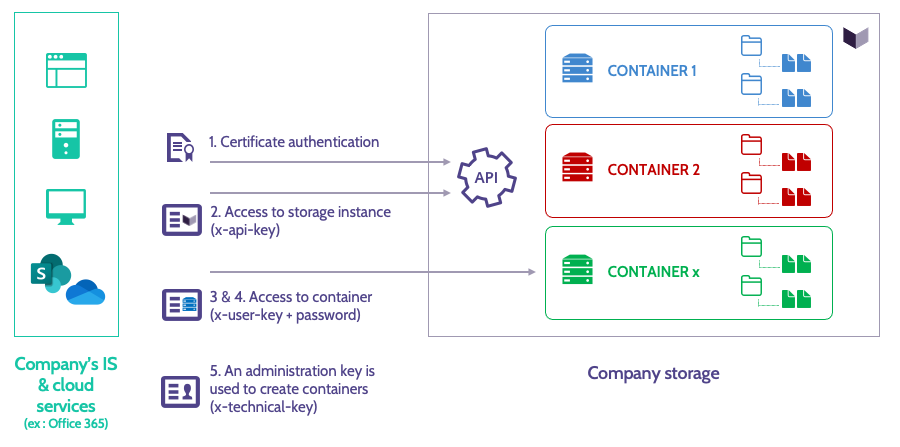
The Shadline API implements various additional authentication and authorization mechanisms.
1. Certificate-based authentication of the product’s client (company)
-
- The user must have the certificate issued by Shadline in order to exchange with the solution. The API server checks the validity of the certificate fingerprint presented by the user for each request made.
- This client certificate must be used for all requests to the API.
2. A global identification to the API
-
- The user must have an API identifier (called x-api-key) provided by Shadline in order to be able to exchange with the solution. The API server checks the validity of this identifier presented by the user at each request made. The identifier is the same for all the users of the same company, it is common to all the containers used.
- This key must be used for all requests to the API.
3. An identification by container
-
- The user must have a « container » ID (called x-user-key because a container is equivalent to an API account) in order to interact with the content of the desired container. The API server checks the validity of this identifier presented by the user at each request made.
- This identifier is generated during the creation of the container by the company. It can be obtained from the Shadline web administration interface. It is different for each container. It is a secret element that protects access to the container data.
- This key must be used for all requests to the API.
4. Container password authentication
-
- The user must have an identifier called hPassword corresponding to the derivative of the password chosen during the container’s initialisation. The API server returns a localPassword during this initialization in order to be able to interact with the content of the desired container. The API server checks the validity of this string presented by the user for each request made.
- This value must be used for all requests to the API involving access to documents (upload, download or delete).
In addition, a single-use token (JWT token) is inserted in each application request in order to reinforce the control of authorisations. Any request is thus carried out in 2 stages:
- A token request
- Then the call to the desired function with the obtained token
The token has a duration of validity of 5 minutes.
Note: At the time of the first connection with an API container, you will be asked to provide the derivative of your password in SHA512 (hpassword) in order to obtain the associated localPassword.
The following diagram shows the main authentication elements used:
Sequencing of authentication and authorization actions
The sequence of steps is done according to the diagram below:

The first exchanges are used to initialize the environment. They are only performed once.
1. The Shadline server verifies the identity of the client (using the upstream client certificate and API key). The customer receives a token in return.
2. The customer defines his password. It receives in return the localPassword value.
The customer can then use one of the API services to execute the desired functionality.
3. The customer requests a token again before each application call.
4. The customer can call up the function of his choice using the authentication elements in his possession.
Format of requests and associated returns
All actions are performed using HTTP request types (such as GET, POST, PUT, DELETE, HEAD, etc.) followed by the entry point, or URL, that will impact the requested resource.
Overall, the requests are formulated as follows:
ACTION /api/[impacted_resource]/{resource_credential}
The HTTP response includes a code representing the status of the operation (e.g. 200 for a successful operation) as well as a data part in JSON or binary for file return. The returned JSON always follows the following format:
"data": {}, // Requested data: object or table according to the resource
The « data » field is present even without specific data, it will then be empty.
In the event of an error, a return of the following form is obtained:
{

"type": "TYPE_ERROR",
"message": "description Human-readable",
"data": [],
"uri": "URI link to error description in API documentation if available."

}
« data » may for instance be present in the case of an error in the validation of input parameters. It specifies the parameters involved and the reasons.
All possible return codes (and any associated error types) are described in section Return codes and error types of this page.
Versioning
Several versions of APIs may be available in a client instance.
The version used must be specified in each URI, after the « /api » term:
/api/vx/[...]
vx represents the version of the API used (« x » is the version number) and […] the call to the resource. For instance:
/api/v2/storage
If this value is not specified, the latest version of the API will be used automatically. We therefore recommend that you indicate the version number in all URIs to ensure the operation of your applications in the event of an API update.
The version of API that can be used will be specified by the Shadline technical team.
Note: The version life cycle is maintained by the Shadline technical team. When an « n » version is deployed in Production, the « n-1 » version remains active and maintained for several months to allow the transition of our customers’ applications to this last release. In addition to adding new routes, technical changes to the input and output parameters can be made to existing routes during these changes. The date of transition of a version of the API to « unsupported » status (unsupported, ie « end-of-life ») will be communicated upstream by Shadline.
Technical description of the requests (list of endpoints)
The list of endpoints is accessible from the following URL:
Postman collection
A Postman collection gathering all the endpoints can be downloaded via the following link to facilitate development work in order to connect to our API :
The configuration of the Postman tool is detailed in the following document:
https://doc.shadline.com/wp-content/uploads/2022/04/SHADLINE_Postman_Configuration.pdf
Return codes and error types
| Code | Type | Meaning |
| 200 | OK | Request successfully executed |
| 201 | CREATED | Successfully stored file |
| 400 | BAD_PARAMETER BAD REQUEST |
Provided parameters doesn’t respect the expected types |
| 400 | ERR_INVALID_TOKEN | Token not properly formatted |
| 400 | ERR_NO_APIKEY | No “x-api-key” header identified |
| 400 | ERR_NO_TOKEN | No « Authorization: Bearer » field identified |
| 400 | ERR_UNABLE_DECODE_PARAM | The payload of the token is corrupted/td> |
| 401 | UNAUTHORIZED | Token expired or invalid
or x-api-key not present or invalid |
| 403 | ERR_ORIGIN_NOT_ALLOWED | Wrong authentication server |
| 403 | FORBIDDEN | Access prohibited because the account has already been initialized |
| 404 | ERR_ORIGIN_NOT_FOUND | The authentication server is unknown |
| 404 | FOLDER_NOT_FOUND | No folder found |
| 404 | ITEM_NOT_FOUND | No document found |
| 404 | FILE_NOT_FOUND | No file found |
| 404 | NOT FOUND | Requested document not found |
| 404 | USER_NOT_FOUND | No container found |
| 413 | PAYLOAD TOO LARGE | The file is too large |
| 422 | UNPROCESSABLE ENTITY | File format problem or invalid expected settings |
| 500 | ERROR | Generic error (internal to services) |
| 509 | LIMITATION_REACHED | API limitations reached |
| 524 | REQUEST_TIMEOUT | The request lasted too long |

